
UAD Plugin MateUAD PLUGIN LIBRARY CLEANER
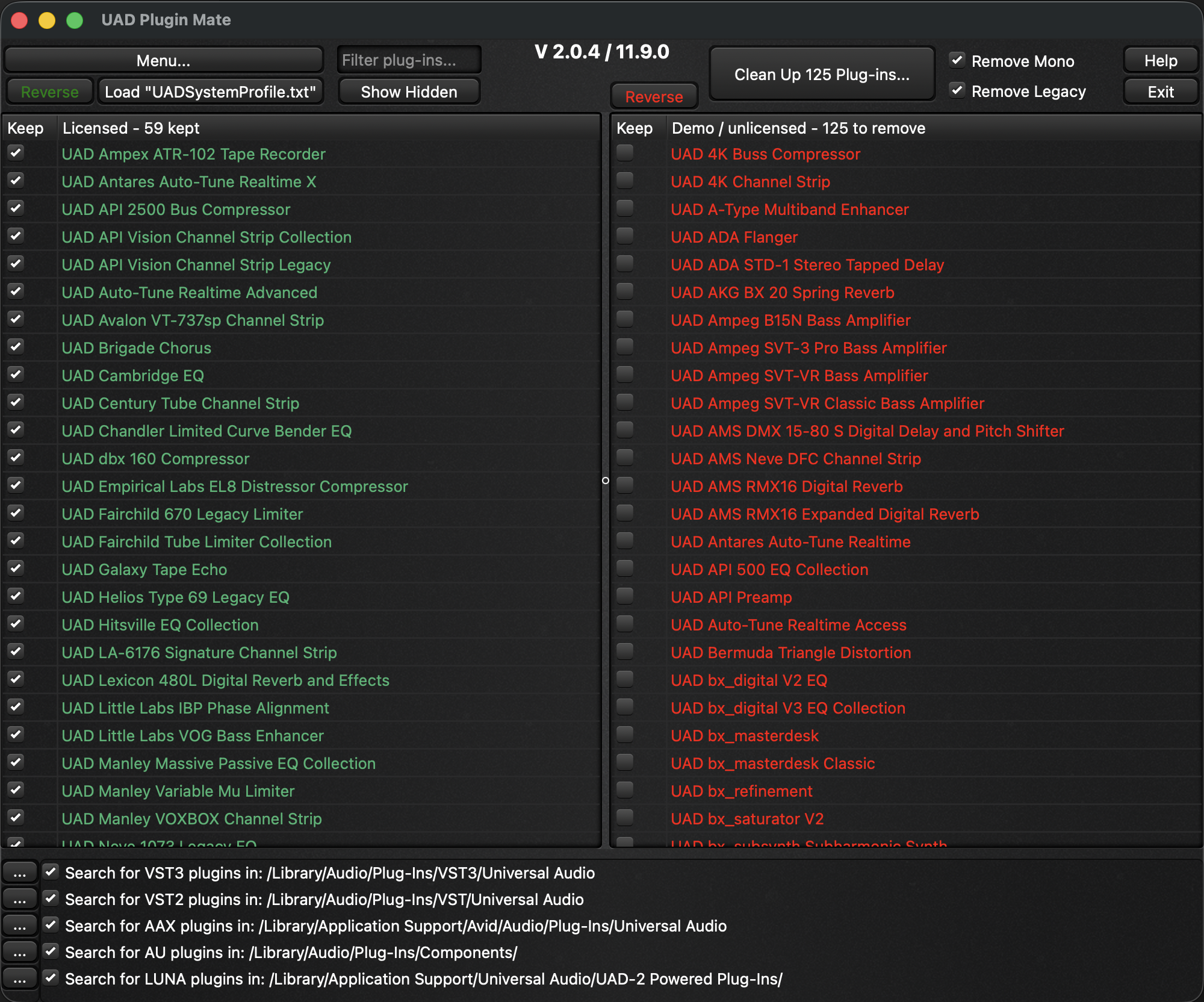
UAD Plugin Mate scans your system, keeps every plugin you're licensed for, and moves the Demo / unlicensed ones into a folder on your Desktop — ready to restore or delete, your choice. Handles VST3, VST, AAX, AU and LUNA automatically.
Real feedback from people who cleaned up their UAD plugin list with UAD Plugin Mate.
Great tool works really well on PC. No more bloated AAX folder.
Cheers.
This is such a fantastic tool; it saves a lot of time from doing it manually. I've donated because it's definitely worth it.
Love this little app! I have been using it since its first release. It's simple and easy to use. So glad someone decided to create this. This app makes mixing and tracking with these plugins a breeze. No more sorting through tons of plugins I don't owned or used anymore. I will definitely be sending this guy a donation for making life a lot easier in the UAD ecosystem. Keep up the great work!
Great tool works really well on PC. No more bloated AAX folder.
Cheers.
This is such a fantastic tool; it saves a lot of time from doing it manually. I've donated because it's definitely worth it.
Love this little app! I have been using it since its first release. It's simple and easy to use. So glad someone decided to create this. This app makes mixing and tracking with these plugins a breeze. No more sorting through tons of plugins I don't owned or used anymore. I will definitely be sending this guy a donation for making life a lot easier in the UAD ecosystem. Keep up the great work!
No deleting unless you want to. UAD Plugin Mate moves the plugins you don't own to your Desktop, and you decide what happens next.
In the UAD Control Panel, open the menu → System Info → "Save Detailed System Profile" and save it to your Desktop.
UAD Plugin Mate prompts to load your profile automatically — or click "Load SystemProfile.txt" to pick it manually.
One click on "Clean Up Plug-ins" hides or removes Demo / unlicensed Plug-ins in all DAWs. In case of removal, it moves them into a "UAD Removed Plugins" folder on your Desktop.
Keep the folder to restore later, or delete it. Re-run after each UAD install or license change.
Stop scrolling past hundreds of demo plugins. Keep only the gear you actually own — across every format and DAW.
Detects unlicensed UAD plugins and moves them to a "UAD Removed Plugins" folder on your Desktop — nothing is deleted unless you choose to.
Cleans up VST3, VST, AAX and AU automatically, plus a dedicated path for LUNA (Console) plugins on macOS.
Pro Tools, Logic, Cubase, Ableton, Studio One and more — it works at the plugin-folder level, so it's DAW-independent.
Use the Filter view and per-plugin checkboxes to keep a demo or remove a licensed plugin. Toggle Mono and disable all Legacy plugins in one click.
Save your chosen plugin selection to a config file and reload it later. Enable or disable each plugin type to be processed.
Free for Mac and Windows. No analytics, no tracking. Donations are welcome but never required.
One short email when a new version ships. Double opt-in, unsubscribe anytime.
Choose your platform. The version number matches the UAD plugins it supports.
UAD Plugin Mate is developed and maintained for the audio community. If it earned a spot in your workflow, you can buy me a coffee — every bit helps keep it updated.
Donate via PayPalUAD Plugin Mate is a free UAD plugin cleaner for macOS and Windows. The Universal Audio installer adds every UAD plugin to your system — including the demo, unlicensed and unauthorized ones you don't own — which clutters the plugin menu in your DAW. UAD Plugin Mate reads your UAD System Profile, keeps the plugins you're licensed for, and moves the rest into a "UAD Removed Plugins" folder on your Desktop. Nothing is deleted, so the change is fully reversible.
It works at the plugin-folder level, so it cleans up VST3, VST, AU, AAX and LUNA (Console) plugins across every DAW — Pro Tools, Logic Pro, Cubase, Studio One, Fender Studio, Ableton Live, Nuendo, Reaper and more. Use it to remove or hide demo UAD plugins and declutter your plugin browser: keep your licensed plugins, clear out the demos, and keep only the gear you actually own. Re-run it after each UAD, UADx or UAD Spark update to keep your plugin list clean.